
Kia Niro: Voice Recognition / Guide to the voice recognition screen
Voice recognition start screen
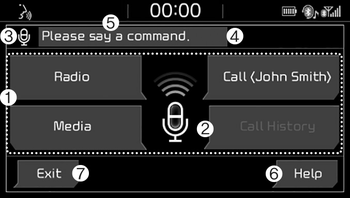
(1) Four most frequently used commands: The four most frequently used commands are displayed.
(2) Commands requiring additional settings: Commands that require additional settings before use are displayed.
(3) Voice status icon display.
 Voice recognition standby.
 Voice prompt in progress.
 Processing voice command.
(4) User voice volume: User voice volume is displayed in real time.
(5) Recognition results: Results for voice command input are displayed.
(6) Help: Available voice commands displayed in stages.
(7) Exit: End voice recognition.
Voice recognition Help screen
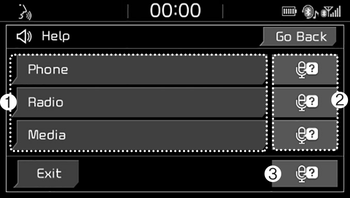
(1) List of voice commands
- Available voice commands are displayed.
- Select or state each command to bring up additional detailed commands.
(2) Voice recognition instructions by item: Voice recognition instructions are displayed by item.
(3) Voice recognition usage instructions: General instructions for use of voice recognition are displayed.
Voice recognition usage instructions screen
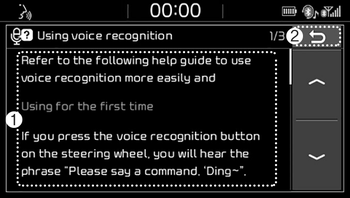
(1) Usage instructions display: Detailed instructions on voice instruction usage.
(2) Close: Close the voice recognition usage instructions screen and show the previous screen.
✽ NOTICE
- Voice recognition is disabled in the voice recognition usage instructions screen. Only manual controls are supported.
- The voice recognition usage instructions screen provides a large amount of information. For safety, the screen is disabled while driving.
 Starting/ending voice recognition, and settings
Starting voice recognition
Press the [VOICE] button on the steering wheel remote control to start voice
recognition and see the voice recognition screen.
Ending voice recognition
In voice re ...
 List of voice commands
Voice command types
• Voice commands are categorized into ‘Global Commands’ and ‘Local Commands.’
1) Global Commands (●): Commands that can be used immediately after voice recognition
...
Other information:
Kia Niro 2017 (DE HEV) Service Manual: Description and operation
Description
The Seat Belt Pretensioners (BPT) are installed inside Center Pillar (LH & RH).
When a vehicle crashes with a certain degree of frontal impact, the pretensioner
seat belt helps to reduce the severity of injury to the front seat occupants by
retracting the seat belt ...
Kia Niro 2017 (DE HEV) Service Manual: Cluster Fascia Panel Components and components location
Component Location
1. Cluster fascia panel assembly
...
