
Kia Niro: Your vehicle at a glance / Interior overview
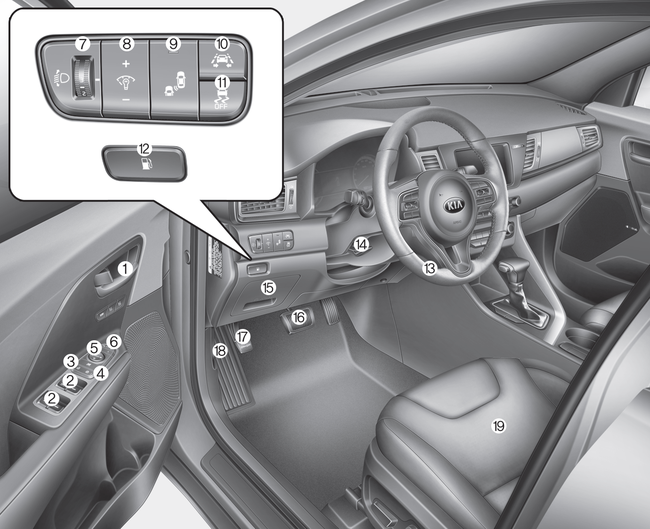
1. Inside door handle
2. Power window switch
3. Central door lock switch
4. Power window lock button
5. Outside rearview mirror control
6. Outside rearview mirror folding
7. Headlight leveling device
8. Instrument panel illumination control
9. BSD On/Off button
10. LKAS On/Off button
11. ESC Off button
12. Fuel filler lid open button
13. Steering wheel
14. Tilt and telescopic steering control lever
15. Inner fuse panel
16. Brake pedal
17. Parking brake pedal
18. Hood release lever
19. Seat
 Exterior overview
■ Front view
1. Hood
2. Head lamp (Features of your vehicle)
Head lamp (Maintenance)
3. Day time running light (D.R.L)
4. Fog lamp
5. Wheel and tire
6. Outside rearview mirror
7. Sunroof
...
 Instrument panel overview
1. Steering wheel audio controls
2. Driver`s front air bag
3. Horn
4. Instrument cluster
5. Wiper and washer control lever (Right)
Turn signal / headlamp control lever (Left)
6. Engine start/s ...
Other information:
Kia Niro 2017 (DE HEV) Service Manual: Special service tools
Special Service Tools
Tool Name / Number
Illustration
Description
Pressure cap pressure checker
0K253-G5100
Used for checking for pressure cap pressure and a coolant leak
...
Kia Niro (DE HEV) Owners Manual: To cancel cruise control, do one of the following
Depress the brake pedal.
Shift into N (Neutral) if equipped with an Dual clutch transmission.
Press the CANCEL/O button located on the steering wheel.
Decrease the vehicle speed lower than the memory speed by approximately
20 km/h (12 mph).
Decrease the vehicle speed to less than app ...
