
Kia Niro: Identification / General information
Identifying a Kia Niro
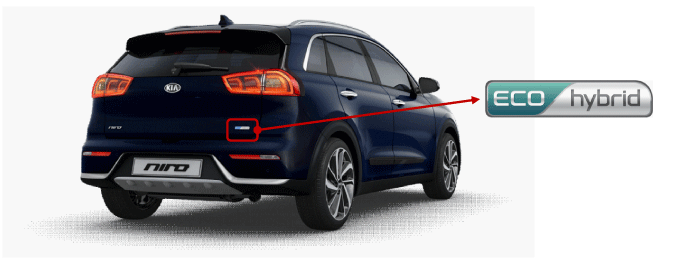
| "Eco Hybrid" logo on tail gate |
The Kia Niro can be easily identified by the "Eco Hybrid" logo attached on the tail gate.
Electrocution Risk The hybrid logo can become hidden after a crash due to damage to the vehicle. Always be sure to utilize additional methods of identification before determining the vehicle is not a hybrid. |

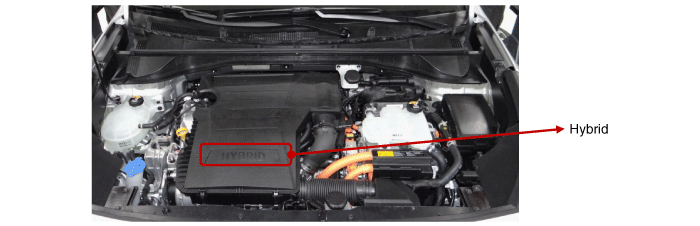
| Engine Room |
A “Hybrid” badge is also displayed under the hood on the engine cover. Also, the High Voltage cabling is orange per SAE standard. Cables run from the bottom of the vehicle where they connect the High Voltage Battery to the HPCU (Hybrid Power Control Unit), Motor, Inverter, and other High Voltage components at the front of the vehicle.The presence of orange cables under the hood identifies the vehicle as an HEV.
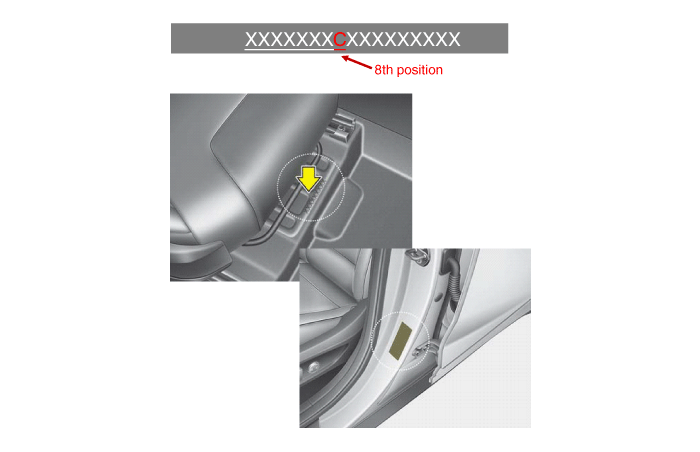
| VIN Label |
The VIN (Vehicle Identification Number) identifies the Hybrid with a "C" displayed in the 8th position, as shown in the below drawing.
The VIN can be found:
| 1. |
Underneath the front passenger seat (or driver seat). |
| 2. |
On the vehicle certification label attached to the driver’s side (or passenger) center pillar. |
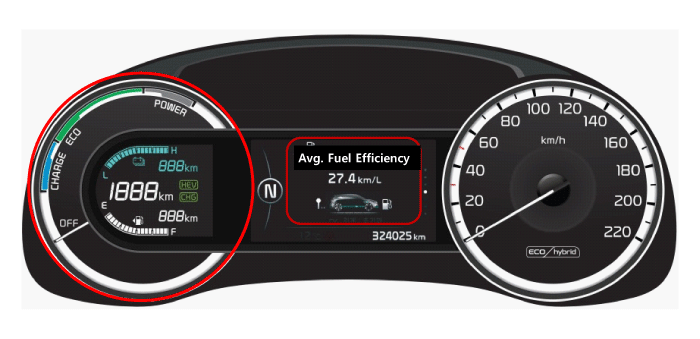
| Niro Cluster Instrument Panel |
The Niro Cluster Instrument Panel displays the HEV specific features such as high voltage battery SOC (State of Charge) in the highlighted part.
 Identification
...

Other information:
Kia Niro 2017 (DE HEV) Service Manual: Inspection mode procedures
Procedure for entering engine
forced activation mode
If the engine needs to be running constantly while the vehicle is stopped to
inspect emission gas or perform maintenance on the vehicle, follow below procedure
to enter engine forced activation mode.
1.
Place ...
Kia Niro 2017 (DE HEV) Service Manual: Front Seat Shield Inner Cover Repair procedures
Replacement
Put on gloves to protect your hands.
•
Use a plastic panel removal tool to remove interior trim pie ...
